> Puzzle Solutions & Investigation Guide
Looking for puzzle solutions for Welcome to the Game 3? You are in the right place. Welcome to the Game 3 asks you to do two things simultaneously: investigate 52 deep web sites for clues, and survive 8 threats in your physical space. This puzzle solutions guide covers how to think like an investigator and how to beat every minigame — from passwords hidden across multiple pages and source code that holds critical puzzle pieces, to all 5 hacking minigames that gate access to the deepest content.
Investigation Mechanics
The investigation in WTtG3 is not a linear list of puzzles — it's a web of connected information. Every page you visit is a potential source of clues, passwords, symbols, and leads. The game never tells you which pages are important. Your job is to figure that out by connecting dots across sites.
The core investigation cycle works like this:
- Discover a URL — from another site, an NPC, or by exploring
- Browse the site — read everything, check source code, download files
- Extract clues — passwords, usernames, symbols, file names, page connections
- Cross-reference — does this password work on a different site? Does this symbol match one you saw before?
- Access deeper content — use what you found to unlock the next layer of the investigation
Source Code Checking
This is the single most important investigation skill in the game. Every page should have its source code checked. The game deliberately hides puzzle pieces, hashes, clues, and password fragments in:
- HTML comments — between comment tags. This is the most common hiding spot
- Invisible text — text styled with display:none or the same color as the background
- Image metadata — filenames, alt text, and data attributes that contain clue fragments
- Hidden links — URLs embedded in unexpected HTML elements
- JavaScript variables — strings and values stored in scripts on the page
Pages known to hide content in source code: Red Triangle, Eyecon, The Hole, Crisis Calls, and several of the timed sites. But check everything — sometimes the most innocuous-looking page holds a critical clue.
Cross-Site Clue Linking
The game's puzzle design connects information across multiple sites. A username found on one page might unlock a locked section on another. A symbol in an image could be a password for a site you haven't even discovered yet. Here are the specific patterns to watch for:
- Username/Password pairs: You'll often find a username on one site and the corresponding password on a completely different site. Record both separately and try the combination on any site that asks for login credentials.
- Symbols and codes: The Red Triangle site and Eyecon are key reference pages for symbol decoding. Symbols found in room decorations or site images often correspond to codes needed elsewhere. Build a symbol dictionary as you play.
- URL chains: Some pages contain links to other pages that don't exist yet — they may redirect to dead sites initially, then become active later as you progress through the investigation.
- NPC-introduced connections: CryptChat NPCs will occasionally mention a site or a clue that connects two pages you've already visited. Pay attention to these hints — they're often the key to unlocking the next stage.
Password Tracking
Passwords in WTtG3 are never random. Every password is discoverable through investigation. The key is recognizing what kind of clue you're looking at:
- Direct passwords — written plainly on a page, sometimes in source code comments. If it looks like a password (a string that doesn't seem to be a username or a name), try it immediately.
- Transformed passwords — a word or phrase that has been altered. Common transformations include leetspeak (3 for E, 0 for O), reversed text, or character substitutions.
- Multi-part passwords — pieces of a password found across multiple pages. You need to find all pieces and assemble them in the correct order.
- Contextual passwords — based on information from a specific page. For example, a date mentioned on a page, a name from a forum post, or a number from an image filename.
Timed Site Strategy
Over 20 sites only appear during specific minute windows each hour. Missing a timed site means waiting a full hour for the next opportunity — and over 47 sites become permanently dead as the night progresses. Here's how to manage timed sites effectively:
- Plan your hour in advance: Know which sites appear in which windows. Keep the schedule from our Beginner Guide handy.
- Prioritize :00–:14 sites first: Five sites appear in this window, giving you the most content density early in each hour.
- Set a mental timer: Every 15 minutes, check the newly available batch of sites before they expire.
- Note which permadead sites you've already visited: Once a site goes permanently dead, cross it off your list so you don't waste time checking it again.
- Watch the game clock: The in-game time display is your lifeline for timed site management. Check it frequently.
See the Deep Web Sites page for the full minute-by-minute schedule of all timed sites.
Note-Taking System
The game expects you to remember or record information across multiple hours of gameplay. Your Notes app is your most important tool. An effective note-taking system includes:
- URL list: Every site you've found, with a brief note about what's on it. Mark which sites are still active vs permadead.
- Password/username pairs: Separate from your general notes. Group them by the site they're intended for, even if you haven't found that site yet.
- Symbol dictionary: Draw or describe each symbol you find, note where you found it, and what it seems to connect to. Red Triangle and Eyecon are the two most important symbol reference sites.
- NPC contacts: What each CryptChat NPC wants (files, links, sabotage), how much they pay, and whether you've established a relationship with them.
- Clue chains: Track connections you've identified between sites. For example: "The password 'x7y2' from Crisis Calls → might work on Red Triangle's locked page."
- Timed site tracker: Which timed sites you've already checked this hour, and which are still available.
1. K3RN3LC0MP1L3R — Kernel Compiler (Typing Challenge)
Type: Typing accuracy minigame. Objective: Enter every highlighted line of code or text exactly as it appears on screen.
Controls
- Keyboard: Type the highlighted text or code exactly as shown
- Enter: Submit the current line
- Backspace: Delete incorrect characters
How It Works
The screen shows a code editor with highlighted lines. You type each highlighted line and press Enter to submit. If you type a wrong character, both the active line and your input turn red. Press Backspace to remove incorrect characters and continue typing. The counter in the lower-left corner shows how many corrupted memory blocks you still need to clear.
Harder Versions
As you progress, you'll encounter corrupted memory blocks that partially obscure the text, code displayed instead of readable text, and multiple blocks filled with code. The method stays the same: type every highlighted line accurately and submit with Enter.
2. memDEALLOCATER — Memory Deallocator (Reflex Lane)
Type: Reflex-based lane navigation. Objective: Move through memory block rows while avoiding red sections to fill the progress bar.
Controls
- A or Left Arrow: Move to the left lane (when the left side is green)
- D or Right Arrow: Move to the right lane (when the right side is green)
- Space: Stay in the center (when both sides are green)
How It Works
Green areas are safe, red areas must be avoided. Each input moves the memory block down by one row and adds a new row at the top. Read the green areas from the bottom upward to decide which key to press next — this is faster than waiting for the key prompt below the memory block. Correct inputs fill the progress bar at the top. Wrong inputs reduce your progress. Once the bar is full, the attack is blocked.
Harder Versions
Harder versions remove the key prompt below the memory block entirely (you must read the colors yourself) and apply a larger penalty when you press the wrong key.
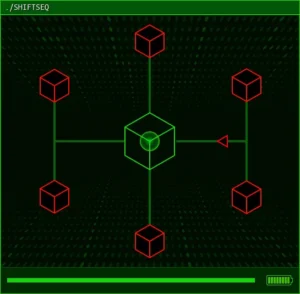
3. shiftSEQ — Sequence Shifter (Grid Combat)
Type: Grid-based node destruction. Objective: Destroy every infected (red) node on the network grid before attacks reach your home node.
Controls
- W/A/S/D: Move up, left, down, right on the grid
- Space: Attack an infected node, or perform an active recharge inside the home node
How It Works
You start inside the home node. Infected nodes appear as red targets on the grid. Move onto each infected node and press Space repeatedly until its health reaches zero. Attacking consumes a limited resource shown by the battery icon — return to the home node to recharge when you're low.
When you stand inside an infected node, its attacks are blocked. If an attack reaches the home node while you're elsewhere, your connection health decreases — this is the only way you can fail early.
Active Recharge Mechanic
Inside the home node, press Space when the expanding pulse overlaps the solid outline of the node. If you press at the wrong time, all recharging is temporarily disabled — so time it carefully.
Harder Versions
Faster and more frequent attacks, more connection health damage when an attack is not blocked, and more infected nodes to destroy.
4. stackPUSHER — Stack Node Pusher (Grid Puzzle)
Type: Spatial reasoning puzzle. Objective: Move every stack node into the delete node while avoiding laughing skull spaces.
Controls
- Left-click a node: Pick it up (works for both pusher nodes and stack nodes)
- Left-click an empty space: Place the node you're carrying
How It Works
The puzzle presents a grid with three types of spaces: pusher nodes (activate stack nodes), stack nodes (must be moved to the delete node), and laughing skull spaces (instant failure if you place anything on them).
Stack nodes can only move within a 3×3 area around the pusher node. You reposition the pusher whenever a stack node needs to move outside its current range. Careful pusher placement lets you move stack nodes toward the delete node in a smooth sequence.
Critical Rules
- Never place a node on a laughing skull space. This causes an immediate failure
- Plan the final layout before moving any nodes
- Move stack nodes first — they have fewer valid positions and determine where the pusher needs to be
- Leave room for pusher nodes to operate — they need adjacent space to activate stack nodes
5. TOKENINE — Token Verification (Pattern Matching)
Type: Visual pattern matching. Objective: Recreate the displayed authorization token by selecting the correct matching parts.
Controls
- Left-click a part: Select it to include in your token assembly
How It Works
A target token is shown at the top of the screen. Below it is a selection of parts — each part is a piece of a token shape. Compare the displayed token with the available pieces and left-click each part needed to assemble the same shape.
The squares below the displayed token show how many parts you need to select. For example, two squares mean the token requires two pieces. Once you select a part, you cannot remove it. If the assembled token is incorrect when checked, your selected parts are cleared and you must try again.
Strategy
- Scan all available parts before making your first selection
- Match the most distinctive part of the token first — unique shapes, colors, or orientations
- Work from the top of the token downward, selecting the corresponding part for each section
- If there are multiple tokens in the series, remember which parts you used for each one
General Investigation Strategies
- Read everything twice. Important clues are easy to miss on a first reading. Re-read pages after your initial exploration.
- Check source code on every page. This is the most common hiding place for critical information.
- Cross-reference constantly. If you find information on one page that seems connected to another page, investigate the connection immediately before you forget the context.
- Try obvious combinations first. Before assuming a puzzle is complex, try the most logical answer based on your available clues.
- Take breaks. If you are stuck on a puzzle, step away and explore other pages. The solution is often found on a different site.
- Verify your information. If a password or code does not work, double-check your notes — you may have misread or misremembered a character.
- Keep the TV off. TV noise masks audio cues for threats and can also distract you from the subtle sounds that clue pages sometimes make.
- Build a workflow. Discover → Browse → Extract → Cross-reference → Access. This cycle works for every layer of the investigation.